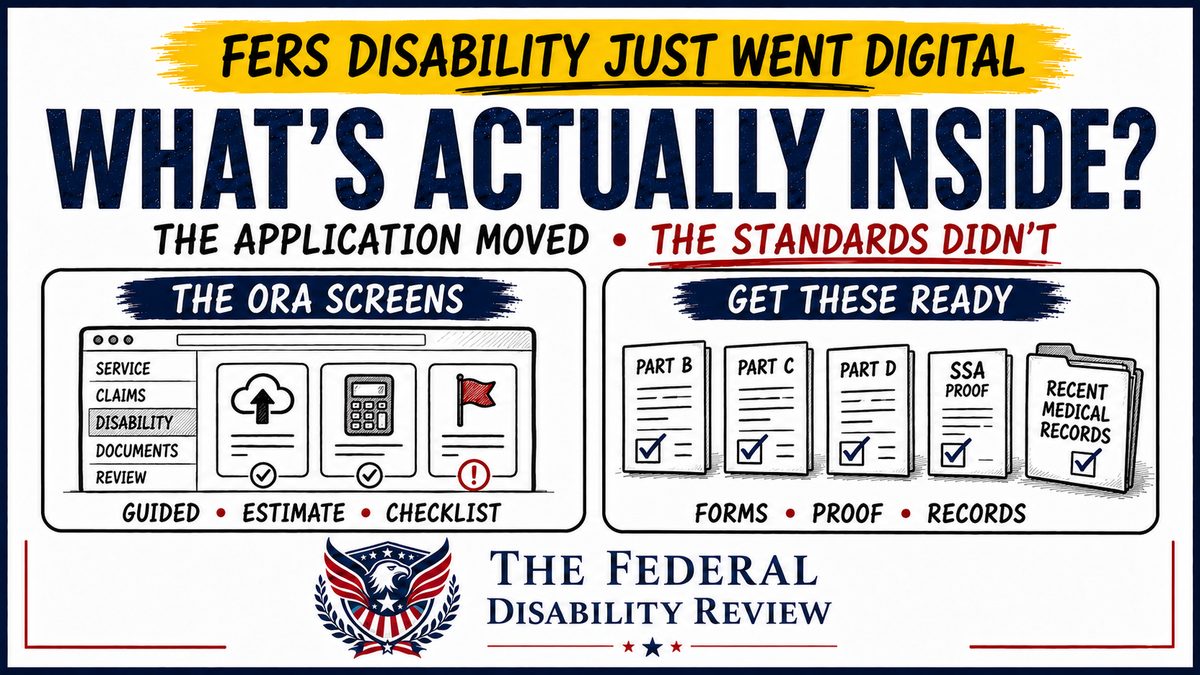
FERS disability retirement now files through OPM’s Online Retirement Application. Announcements will tell you it moved online. This article walks through what the system actually asks, section by section, and what you should have ready before you open it.
General educational information only. TFDR is not a law firm and does not provide legal or medical advice, represent applicants before OPM, or predict individual outcomes.
For years, FERS disability retirement was the paper holdout. While regular retirements moved into OPM’s Online Retirement Application (ORA), the disability package — the SF 3112 series — stayed in envelopes. That has changed. OPM now directs disability retirement applicants into ORA, and the application is a guided, screen-by-screen process with document uploads, a live annuity estimate, and a checklist that tells you what is missing before you can submit.
I walked through the new system myself, screen by screen, and this article reflects what the application actually asks. It is written for the person sitting down to file, because the difference between a smooth filing and a frustrating one is mostly about what you have ready before you start.
How you get in
The path depends on your status. If you are still employed, you generally start through your agency’s human resources office, which initiates your application in ORA. If you are already separated, you apply directly to OPM: from the ORA portal (retire.opm.gov/portal) you select the options for former federal employees and start a disability application, then complete Login.gov identity verification. Either way, you will need a Login.gov account tied to a personal email address — not your agency email, which you may lose or may have already lost.
One thing to know up front: your retirement type is set when the application is created and cannot be changed inside it. The system tells you this plainly. If your situation changes, that is a conversation with HR or OPM, not a dropdown.
The shape of the application
The left side of the screen shows the whole journey: Overview, Details, Service history, Military service, Claims, Family details, Survivor benefits, Insurance elections, Payment, Disability documentation, Documents, and Review & submit. Most sections are short. Two of them — Disability documentation and Documents — are where the real work lives, and they are the reason to prepare before you open the system rather than after.
The early sections: identity, service, and history
The first stretch is straightforward but benefits from having records in front of you. You confirm your identity and address. You enter your separation details — the date, your former agency, and your position title. The system shows your service computation date and total creditable service from OPM’s records, and you can add service records if something is missing.
Veterans get their own section. You enter each period of honorable active service and upload your DD-214 for each period. The system then asks the classic military-service questions: whether you have service after 1956, whether you paid the deposit to your agency for that service, and whether you receive or have applied for military retired or retainer pay. If you served, have your DD-214 saved as a PDF before you start, because the section expects it.
The Claims section asks whether you have ever taken a refund of retirement contributions or made a service credit deposit, whether you have previously filed a CSRS or FERS application, and whether you have applied for, received, or are awaiting a workers’ compensation award. That last question covers past and present claims — awarded, denied, and pending.
Family, survivors, and insurance: decisions with dollar amounts attached
If you are married, the application collects your spouse’s details and asks you to upload your marriage certificate. It asks about court orders involving a former spouse. It collects dependent children, including whether a child is disabled or a full-time student, because those answers drive survivor and insurance eligibility.
Then come the elections, and this is where ORA genuinely improves on paper: a live estimate panel sits beside the questions and updates as you choose. The survivor benefit defaults to 50% to your spouse, with the monthly cost shown; choosing a different election requires your spouse’s consent. Health insurance shows your actual FEHB plan and asks whether you want to carry it into retirement. Life insurance walks through your FEGLI basic coverage and any Options A, B, and C you hold, with the monthly cost of each choice displayed next to it. The system also asks about dental and vision (FEDVIP), long term care (FLTCIP), and whether you want to update beneficiaries.
Treat the estimate as an estimate. OPM’s own note says the figures do not yet account for things like military service deposits, dental and vision premiums, or tax withholding. It is a planning tool, not a promise.
Payment is the last of the routine sections: direct deposit details, and a W-4P upload if you want federal income tax withheld on your terms rather than the default.
Disability documentation: where the application changes character
This section is the SF 3112 series, rebuilt as screens — and the questions will be familiar to anyone who has seen a 3112A. You describe your medical conditions, and the system is explicit that OPM considers only the conditions you discuss in the application. You describe how those conditions interfere with performance of your duties, your attendance, or your conduct. You describe other restrictions on your activities. You explain what accommodations you requested from your agency and whether your agency was able to grant them, with an upload slot for supporting documentation. You state your current status — working with or without accommodation, on leave without pay, or separated — and, if separated, what work you have performed since. You give the approximate date you became disabled for your position, answer whether you have been hospitalized, and list the physicians from whom you plan to request statements, with addresses and treatment dates.
Two parts of this section deserve special attention.
First, Social Security. The application asks whether you have applied for Social Security disability benefits and provides an upload slot for your SSA application receipt or award notice. OPM’s notice inside the system says final processing cannot be completed without it. The SSDI application requirement did not go away when the process went digital — it is now a checkpoint with its own upload box.
Second, the parts other people complete. Part B, the Supervisor’s Statement, is completed by your immediate supervisor — on paper — and uploaded. Part C, the Physician’s Statement, is completed by your doctor and uploaded, and the system reminds you that your physician must be given your most current position description. Part D, the Agency Certification of Reassignment and Accommodation Efforts, is completed by an authorized agency official and uploaded. Going digital changed the envelope, but it did not change the fact that three parts of your package depend on other people’s schedules. Start those requests early, because the system will not let you finish without them.
On medical records, ORA carries an instruction worth reading twice: upload medical documentation from the past year only, because older records may delay processing, and OPM will contact you directly if it needs more. That is a real shift from the send-everything instinct. Recent, relevant records tied to your current position description are what the system is built to receive.
The Documents checklist: the quiet best feature
Near the end, the Documents section lists every required upload and flags what is missing in red — by name, with the reason it is required. Under the paper process, the most common self-inflicted wound was mailing an incomplete package and learning about it months later. The system now tells you before you submit. It is not glamorous, but for applicants it may be the single most valuable change in the whole rollout.
Review & submit shows your entire application on one page for a final check, and then you certify and submit electronically.
What did not change
The application moved. The standards did not. Eligibility still turns on the same standard: a medical condition that has caused a service deficiency in performance, conduct, or attendance — or that is otherwise incompatible with useful and efficient service in your position. The quality and consistency of your evidence still decides the outcome, and the filing deadline is unchanged: OPM states the application must be received within one year of your separation date. You must still apply for Social Security disability benefits. A cleaner filing experience is a real improvement, but it is the container, not the case.
Before you open ORA: a short checklist
- ☐ A Login.gov account on a personal email address
- ☐ Your SF-50 and exact separation date
- ☐ DD-214 as a PDF, if you have military service
- ☐ Marriage certificate as a PDF, if married
- ☐ Your SSA disability application receipt or award notice
- ☐ Physician names, addresses, and treatment dates
- ☐ Requests already in motion for the Supervisor’s Statement (Part B), Physician’s Statement (Part C), and Agency Certification (Part D)
- ☐ Medical records from the past year, aligned to your current position description
- ☐ A W-4P if you want specific tax withholding
If you gather that list first, the application becomes what it was designed to be: a guided form. If you open the system first, it becomes a scavenger hunt with a deadline.
A complete application is not the same as a well-prepared one
ORA is a real improvement, and I want to give OPM credit for that. It shows you the path, keeps your documents in one place, and tells you what is still missing before you submit.
But notice what the system checks: whether a required item is present. It cannot read your applicant statement and tell you whether the explanation is clear. It cannot see that your supervisor’s statement describes your attendance one way and your own statement describes it another. It cannot tell you whether your medical records actually support the restrictions you listed, or whether the whole package makes sense when an OPM specialist reads it front to back — because that is the part of this process that was never about forms.
So use the new system, and be glad it exists. Just remember that a green checklist means your application is complete. Whether it is persuasive is still up to the record you built — and that work happens before you ever log in.
Sources: OPM, Online Retirement Application (ORA); OPM, Applying for FERS Disability Retirement; the ORA portal itself is at retire.opm.gov/portal.
Sitting down to file?
A free assessment can help you see your timeline and your checklist clearly before you open the system.
Get a Free Assessment